Screen and Glass Damage
Spider-cracked front glass is especially common on iPhone 11 and 12 models, while glass backs have added another breakable surface since the iPhone X generation.
At Phoenix Phone Repairs, the most common iPhone repair issues in Phoenix include cracked screens, fast battery drain, charging failures, water damage, and camera trouble. Some symptoms call for a part replacement, while others may be resolved with cleaning, settings changes, or a careful diagnostic. Identifying the cause first helps avoid paying for parts the phone does not need.
Spider-cracked front glass is especially common on iPhone 11 and 12 models, while glass backs have added another breakable surface since the iPhone X generation.
Unexpected shutdowns at 20-30% charge or battery health below 80% point toward battery wear. Charging failures often begin with lint, bent pins, or corrosion rather than the cable.
A phone that will not charge could need a $40 port cleaning or a $119 battery service. Testing the port, battery, logic board, and software state helps separate those very different repairs.
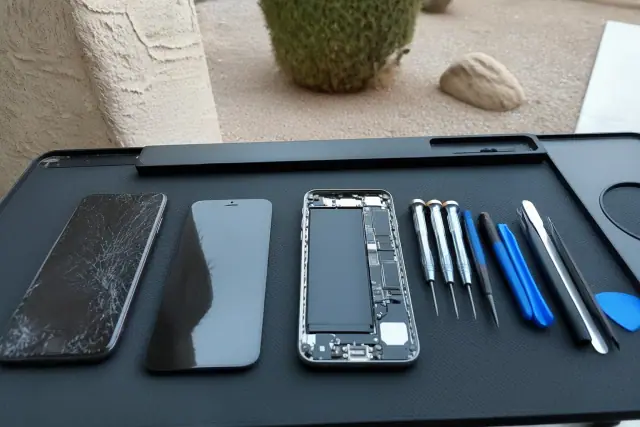
Surface cracks beside display failure, touch dead zones, or image distortion. The comparison explains why similar-looking damage may require different work.
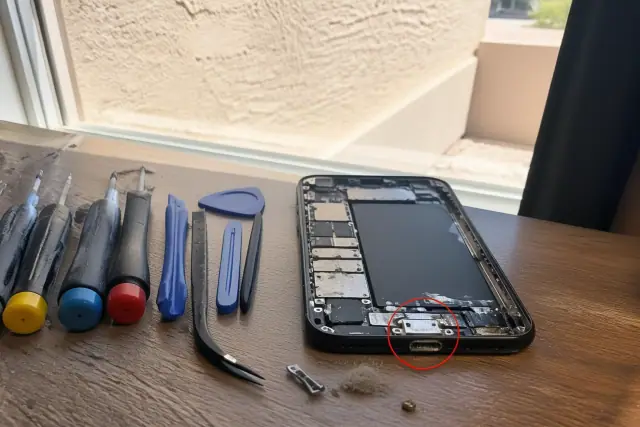
A close view of port debris, damaged pins, and corrosion shows why cleaning and testing should come before a full charging-port replacement.
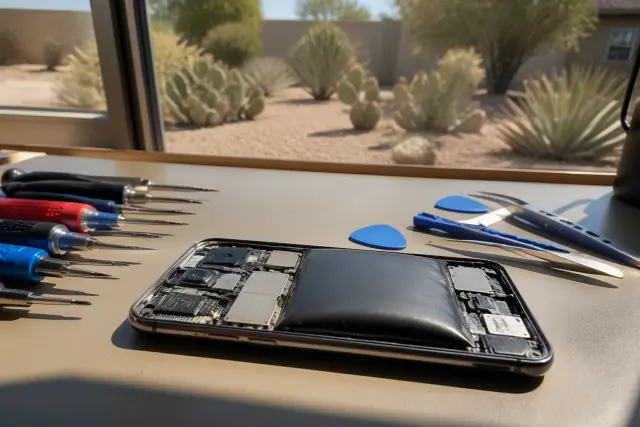
A lifting screen, expanded battery, and heat-related stress without exaggerating the damage. These signs matter during Phoenix summers.
Record what changed and when, then check the glass, touch response, battery health, port connection, camera focus, storage, and software state. A basic check can separate a software crash from a failed battery in about five minutes.
An iPhone 15 has tighter internal tolerances and different adhesive than an iPhone 11. A single cracked screen also differs from combined screen-and-back-glass damage, while genuine and quality aftermarket parts carry different cost and calibration trade-offs.
Phoenix monsoon season runs roughly June through September, and pool exposure adds another water risk. Oxidation can spread across circuitry within hours, so a same-day assessment has a better outlook than waiting a week for the phone to dry.
Slow performance, crashes, restarts, and wireless connection problems may come from nearly full storage, a corrupted update, or settings. Software checks can resolve many of these complaints without hardware replacement.
| Symptom | Likely Cause | Useful First Check |
|---|---|---|
| Cracked glass | Front glass or display damage | Test the image and touch response |
| Fast drain or shutdown at 20-30% | Battery wear, especially below 80% health | Check battery health and charging history |
| Phone will not charge | Lint, bent pins, corrosion, or a failed battery | Clean and test the port before replacement |
| Camera will not focus | Cracked lens glass or sensor trouble | Inspect the lens before replacing the camera |
| Crashes or wireless drops | Full storage, an update, or settings | Run software checks before hardware work |
| Recent water exposure | Oxidation spreading across circuitry | Arrange a prompt corrosion assessment |
Physical problems include cracked screens, shattered back glass, bent ports, and water intrusion. Functional failures include fast battery drain, camera focus trouble, dropped wireless connections, boot loops, and phones that will not turn on. Diagnosis should check the logic board, battery health, port connections, and software state before assigning a repair.
Model, damage severity, part type, coverage, and remaining software support all change whether repair makes sense. Published official-service figures cited for comparison are $119 for a battery, $159 for back glass, $249 for a rear camera, $379 for a screen, and $799 for other damage, while independent screen repair for older models often falls around $100-$175. Projected support windows in this guide place the iPhone XS and XR around 2026, the iPhone 11 and second-generation SE into 2027-2029, the iPhone 12 around 2028-2030, and the iPhone 13 and third-generation SE into the early 2030s. These dates are planning estimates, so repair cost should be weighed against current app and software compatibility.
The most common iPhone repair is a cracked screen, with battery replacement and charging-port service close behind. For battery care, the 40-80 rule means keeping charge between 40% and 80% when practical instead of repeatedly cycling from near 0% to 100%; a health reading below 80% often accompanies faster drain or shutdowns. Slow performance, crashes, restarts, and connection drops can come from nearly full storage, an update, or settings rather than hardware failure. On older models nearing a projected support window, compare repair cost with remaining software compatibility before choosing repair or replacement.
For iPhone problems in Phoenix and across the Valley, a free diagnostic can identify whether the issue is the screen, battery, charging port, software, or water exposure. You receive a written estimate before work begins; most screen, battery, and port repairs are available the same day, while water or motherboard damage may need a longer assessment.